Import and export
The library supports an import of a CSV file from Goodreads or StoryGraph, and an export to a CSV file in the Goodreads format. Use it to bring a reading history into the library. To move the whole library to another Home Assistant, use the Home Keeper export.
Export from Goodreads
- Sign in to Goodreads on a computer.
- Open My Books, then Import and export in the left column.
- Select Export Library.
- When the file is ready, download it. The file name is like
goodreads_library_export.csv.
For StoryGraph, open Manage account, then Export StoryGraph library, and download the CSV file.
Import a file
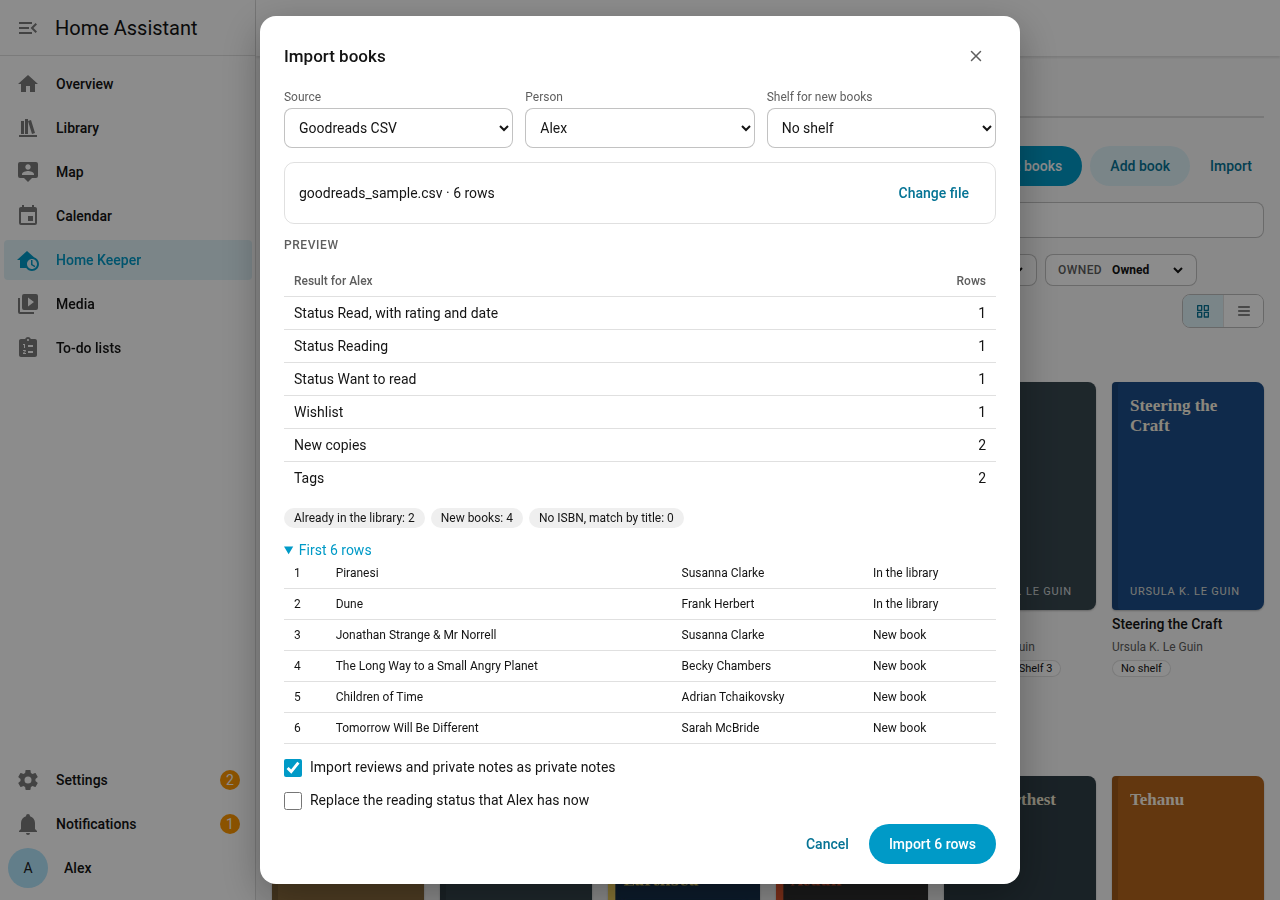
- Open the Books page of the Library tab, and select Import.
- In Source, select Goodreads CSV, StoryGraph CSV or Home Keeper Library CSV.
- Select the Person whose reading status the file holds.
- Select a Shelf for new books, or no shelf.
- Select Choose file and select the CSV file. The file must be 5 MB or smaller.
- Read the Preview. It shows the counts and the result for the first 200 rows. The preview changes nothing.
- Select Import to write the rows.
Options:
- Import reviews and private notes as private notes: on by default.
- Replace the reading status that person has now: off by default. With it off, a book that already has a reading status for the person keeps it.
How rows match books
The library looks for each row in this order:
- The ISBN-13.
- The ISBN-10.
- The title and the first author.
A row that matches no book adds a new book. The library then reads Open Library for the details and the cover of each new book, after the import.
What a Goodreads row gives
| Goodreads | Library |
|---|---|
| read shelf | Status Read, with the rating, the date read and the read count |
| currently-reading shelf | Status Reading |
| to-read shelf, with an owned copy | Status Want to read |
| to-read shelf, with no owned copy | The wishlist of the person |
| Owned copies | 1 copy on the shelf for new books, if the book has no copy. The format comes from the binding. |
| Other shelves | Tags |
| Review and private notes | Private notes |
StoryGraph rows give the same, from the read status, the star rating, Owned?, the format, the tags and the review. A star rating with a decimal rounds to the nearest whole star.
Export
Open the Settings page of the Library tab. In Export, select a person or All books, no reading status, select the format, and select Export CSV.
- Goodreads CSV has the Goodreads columns. Goodreads and StoryGraph import it.
- Home Keeper Library CSV has every book and copy field and the location of each copy. Import it into another Home Keeper Library to move the library.
The file name has the format and the date, such as library-goodreads-2026-10-05.csv.
Home Keeper export includes your library
The Home Keeper export holds the library. 1 export and 1 import move Home Keeper and the library together. The library section has these records:
- The rooms, bookcases and shelves.
- The books, the copies and the wishlist.
- The loans.
- The reading status and the settings of each person.
A .zip export also holds the cover files. A YAML export has no covers. The export result counts each cover that it skips.
How the import matches records
The import adds a record or updates the record that matches. It never deletes a record that is not in the file.
- A book matches by its ID, then the ISBN-13, the ISBN-10, and the title and first author.
- A room matches by its ID, then its name. A bookcase or a shelf matches by its ID, then its name in the same room or bookcase.
- A copy or a loan matches by its ID.
- A person matches by the ID on this Home Assistant, then by the name. An area and the to-do list of a wishlist match the same way.
If no person matches, the preview shows a warning. The import then skips these records of that person:
- The reading status and the settings.
- The wishlist entries and the borrowed books.
To keep these records, give the person the same name on the new Home Assistant.
After the import, the library makes the Home Keeper task of each open loan and the to-do item of each wishlist book again.
Services
Home Keeper calls 2 admin-only services. A script can call them too:
home_keeper_library.export_datareturns the library section.home_keeper_library.import_datareads a library section. Withdry_run: trueit only reports the changes.