Notifications
Home Keeper supports sending a mobile-app notification for due tasks, with the action buttons Mark done, Snooze, Skip, and Open. This is useful for completing a task from the phone lock screen and for sending each user the tasks from their own profile. The buttons act on the task in Home Keeper:
- Mark done completes the task and advances the recurrence.
- Snooze defers the due date by the configured snooze duration.
- Skip moves the task to its next occurrence.
- Open opens the task in Home Keeper.
Configuration
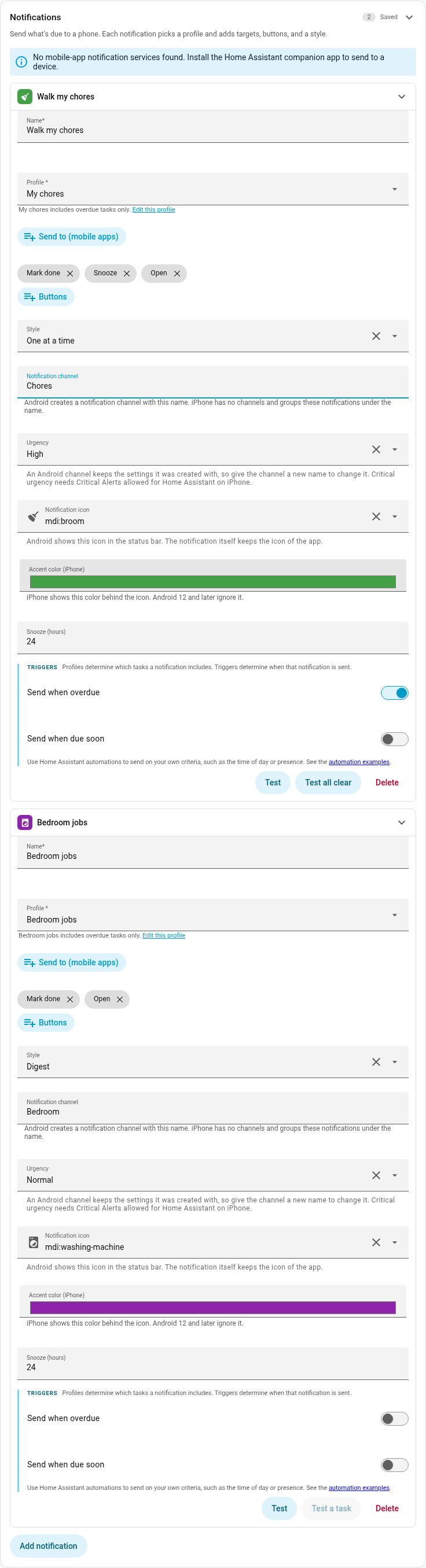
Configure notifications in Settings → Notifications. Each notification has these fields:
- Profile: the Profile whose Include field selects which tasks the notification contains. All due tasks are included if no profile is set.
- Send to: one or more
mobile_app_*companion-app devices selected from a list. Only these devices andpersistent_notificationare supported as targets. Other notify services are not supported. - Buttons: which of the 4 buttons are shown and the snooze duration.
- Style: walk or digest. A walk sends the first due task. Each Mark done, Snooze, or Skip then sends the next due task. When no task is due the walk sends an "All caught up" notification. The digest style sends one summary of all due tasks.
- Notification channel and Urgency: the delivery settings that the phone applies. See Channels and urgency.
- Notification icon and Accent color: how the notification looks on the phone. See Icons and colors.
- Triggers: send the notification when a task in the profile becomes overdue or due soon. A trigger sets only when the notification is sent, not which tasks it contains.
Press Test on a notification to send it now. Home Keeper saves the notification
first, then calls home_keeper.notify for it, so the phone receives the delivery the
form shows. Test always sends a notification. The notification shows a task when the
Profile holds one. It says "All caught up" when the Profile holds none.
A second button beside Test sends whichever notification Test does not. It reads Test all clear when the Profile holds a task. It reads Test a task and stays grey when the Profile holds none, because Home Keeper has no task to show.
Channels and urgency
Home Keeper supports a Notification channel and an Urgency on each notification. This is useful when a medication task and a battery task must not arrive in the same way.
On Android the channel is a notification channel. The companion app creates the channel the first time a notification uses the name. The channel then appears in the phone settings for Home Assistant, where the user sets its sound and its Do Not Disturb override. A Medication channel can then make a sound during Do Not Disturb while a Batteries channel stays silent.
iPhone has no channels. Home Keeper sends the same name as a thread identifier, so these notifications group together. The urgency becomes the iOS interruption level.
| Urgency | Android | iPhone |
|---|---|---|
| Quiet | Low importance | Passive |
| Normal | App default | Active |
| High | High importance | Time-sensitive |
| Critical | Max importance | Critical alert |
At High and Critical urgency Home Keeper also asks Android to deliver the notification immediately. An idle phone otherwise holds it until the next batch.
Critical urgency has a condition on each platform. The user must allow Critical Alerts for Home Assistant in the iPhone settings. On Android a channel keeps the settings it was created with. A change of urgency does not move a channel that already exists. Give the channel a new name or change the channel in the phone settings.
If the channel is empty, the notification arrives on the General channel of the companion app.
Icons and colors
Home Keeper supports a Notification icon and an Accent color on each notification. This is useful when 2 reminders must not look alike. A Medication notification can show a pill on the phone while a Batteries notification shows a battery.
The icon is a Material Design icon such as mdi:pill. An empty field uses the icon of
the companion app. Both fields also set the icon that Home Keeper shows on the
notification in Settings → Notifications.
On Android the icon appears in the status bar at the top of the screen. The notification in the notification shade keeps the icon of the app, and no field changes that. Android 12 and later ignore the accent color, so that field has no effect there.
The companion app has its own copy of the icon set, and that copy is older than the one in the icon picker, so a recent icon can be missing from it. A name that the app does not have falls back to the Home Assistant icon. Select an older icon if the one you picked does not appear on the phone.
On iPhone the icon becomes the icon of the notification, and the accent color fills the circle behind it. The notification then uses the style that a message uses, so it also shows the name of the task as the sender.

Language
The button labels and the notification text are localized to the language that is configured for the Home Assistant instance in Settings → System → General. The setting is instance-wide, so every user receives notifications in the same language.
Automations
With Send when overdue or Send when due soon on, a notification is sent when a task in the profile becomes overdue or due soon. Use a Home Assistant automation for more control over when notifications are sent. Send only when a person is at home, or send during a "Chore time" calendar event.
The home_keeper.notify service sends a notification from an automation. Set
notification: to a saved notification or profile: to a saved Profile. Set
target: to override the destinations. The button actions fire events that other
automations can use. See Events & automations.
Two more fields change one call. status: replaces the Profile's own status for that
call, so all sends every task the Profile holds without a second Profile. when_empty: all_clear sends the "All caught up" card when no task matches. Home Keeper sends
nothing in that condition by default.
Automation examples
Home Keeper sends a notification once. Use a Home Assistant automation to send it
again until the task is complete. The home_keeper.notify service sends nothing when
no task matches, unless the call sets when_empty: all_clear. A schedule that runs
all day costs nothing on a day with no due task. Build these automations in
Settings → Automations & scenes.
Repeat a notification every 2 hours. This automation sends Walk my chores again every 2 hours between 08:00 and 21:00.
automation:
  - alias: "Home Keeper → chores every 2 hours"
    trigger:
      - platform: time_pattern
        hours: "/2"
    condition:
      - condition: time
        after: "08:00:00"
        before: "21:00:00"
    action:
      - service: home_keeper.notify
        data:
          notification: Walk my chores
Send only when a person is at home. This automation looks every 30 minutes in the evening. It sends the notification only when the person entity is home.
automation:
  - alias: "Home Keeper → chores while I'm home"
    trigger:
      - platform: time_pattern
        minutes: "/30"
    condition:
      - condition: state
        entity_id: person.sam
        state: home
      - condition: time
        after: "17:00:00"
        before: "21:00:00"
    action:
      - service: home_keeper.notify
        data:
          notification: Walk my chores
Repeat a critical notification every 15 minutes. This automation looks every 15 minutes between 08:00 and 10:00. Give the notification its own channel at Critical urgency.
automation:
  - alias: "Home Keeper → medication window"
    trigger:
      - platform: time_pattern
        minutes: "/15"
    condition:
      - condition: time
        after: "08:00:00"
        before: "10:00:00"
    action:
      - service: home_keeper.notify
        data:
          notification: Medication
Each automation sends the same notification, so the phone replaces the previous one instead of adding a second. The next run of the automation finds no due task after the task is complete, and the notifications stop.